Sitrep
daily driverOne place to see what every AI assistant is doing, and answer when they need you.
Sitrep is a dashboard where all of your AI assistants can post a quick status update or ask a question. Whether Claude is working on code, a script is running overnight, or Codex just finished a task, they all check in here. You can reply from your laptop or phone in seconds.
- Python
- Django
- SSE
- Bootstrap
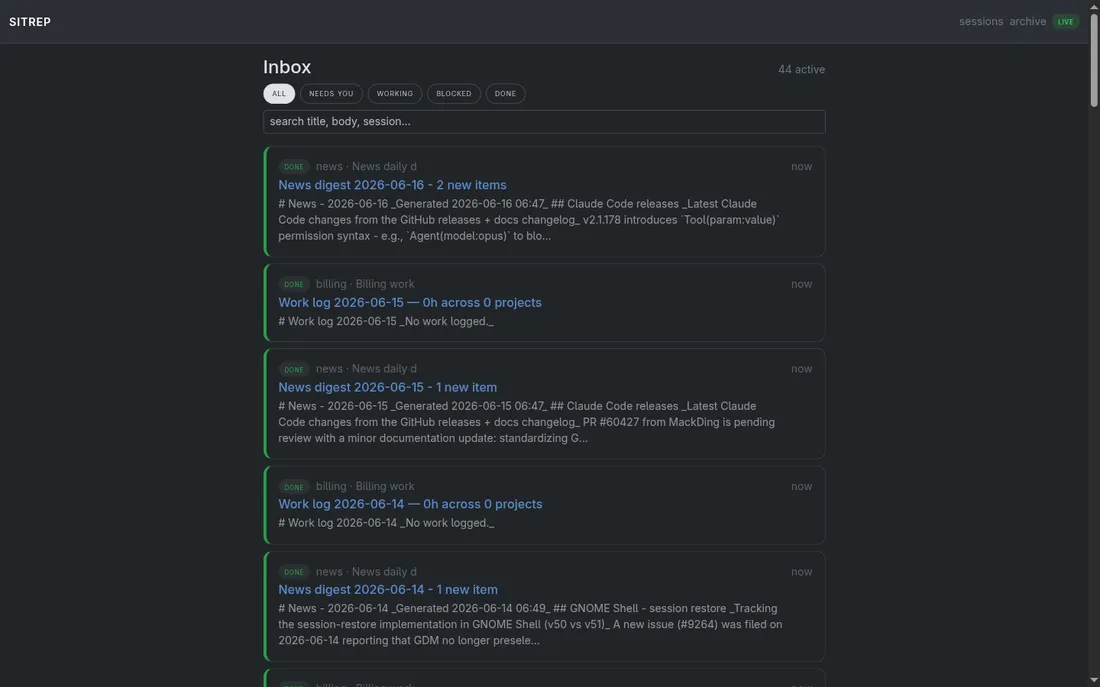
Running a bunch of AI assistants at once is like having a bunch of helpers in different rooms; you lose track of who's doing what and you miss it when one gets stuck. Sitrep fixes that. Every assistant has the same inbox to drop a message into, and you have one place to glance at. The really fun part: when an assistant asks a question, Sitrep wakes it back up the moment you answer; no polling, no delay, just instant handoff.
What it does
Any agent session - Claude, Codex, Cursor, a shell script, whatever - can post a short status report ("working on the billing bug"), a question ("which branch should I target?"), or a chart or diagram it wants you to look at. These all land in a live-updating inbox that you can open in a browser tab or on your phone. Assistants can mark themselves as working, blocked, done, or waiting for input. You can answer structured questions (yes/no, pick from a list, free text) right from the page. The moment you answer, Sitrep wakes the assistant back up so it can keep going; no assistant needs to sit and spin waiting for a reply.
Why it's neat
Every assistant checks in here
Claude, Codex, Cursor, and even shell scripts all post to the same inbox; you never hunt for status across six different windows.
Questions get instant replies
When an assistant asks something and you answer, it wakes up immediately and keeps going - like tapping someone on the shoulder instead of waiting for an email reply.
Charts and diagrams, right in the feed
Assistants can attach Mermaid diagrams or charts alongside their status reports, so you can see the picture, not just the text.
How it works
1. An assistant posts a sitrep
Any running agent calls the Sitrep API with a title, a status, and an optional body or chart - one line of code.
2. It shows up live in your browser
The dashboard updates instantly via a live push connection; no refresh needed, works on mobile too.
3. You answer (or just read and move on)
For questions, you pick or type an answer right on the page; for status updates, you can just glance and close the tab.
4. The assistant gets woken up
If an assistant was waiting for an answer, Sitrep pings it the moment you respond so it can pick up exactly where it left off.