Agent Sessions
daily driverA session browser that lets you read exactly what the agents said, thought, and did.
Agent Sessions is a terminal app I built to browse the conversation history left behind by AI coding assistants. It reads the session files from Claude Code, Codex, Cursor, Copilot, Gemini, and more, then shows the full conversation (messages, tool calls, internal reasoning) in a three-step browser: pick a project, then pick a session, then read the whole conversation laid out in plain text. Think of it as a log reader for the AI layer of your codebase.
- Python
- Textual
- Rich
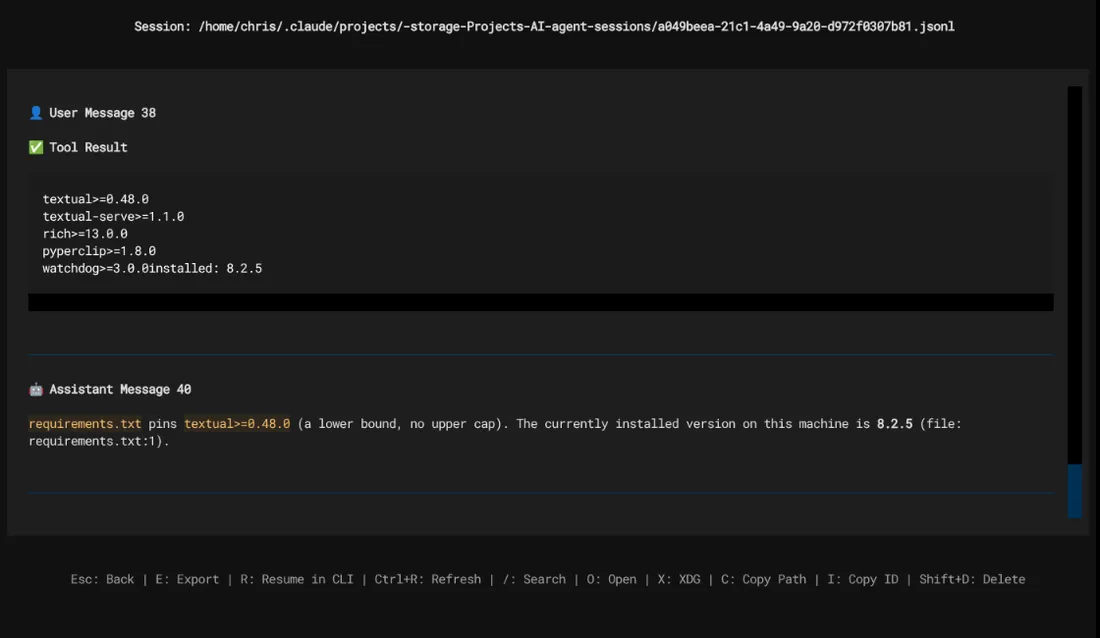
Every AI assistant leaves detailed session files on disk, but those files are dense JSON blobs; not something you'd want to read raw. Agent Sessions turns them into something navigable: pick a project, pick a session, scroll through what happened. You can search across all sessions, jump straight to the most recent one, or ask a natural-language question like "the coderoo session from yesterday" and it'll find it. Because it reads all the major runtimes through one unified parser, you get the same clean view whether the session was Claude, Codex, or Cursor.
What it does
When you work with an AI assistant, that assistant writes a full record of the session to disk - every message, every file it read, every command it ran, and (for Claude) even its internal reasoning. The format is a raw JSONL file - one JSON blob per line. Useful for a program; unreadable for a person. Agent Sessions is that reader. It's a terminal app (called a TUI, a text-based interface) that presents a three-step browser: pick a project, pick a session, then read the whole conversation laid out in plain text. You can search by keyword, jump to the most recent session, export a session to Markdown, or query in plain English. It also includes a standalone parser library, the same one Sitrep uses to read session data for its dashboards and nightly reports.
Why it's neat
Works across the tools you actually use
Claude, Codex, Cursor, Copilot, Gemini, and more - one browser that reads all of them through the same parser engine.
Plain-English search
Type "the coderoo session from yesterday" and it finds the right one; no UUIDs required.
Shows the whole picture
Messages, tool calls, file reads, command runs, and Claude's internal reasoning blocks are all visible in one scroll.
How it works
1. Pick a project
The project list shows every folder that has AI session history, with a count of sessions stored for each.
2. Browse sessions
The session list shows each conversation with a generated title, timestamp, and the models used.
3. Read the conversation
The session viewer displays the full back-and-forth in plain text - messages, tool calls, and reasoning all laid out clearly.
4. Search or export
Search within a session, search across all of them by keyword or natural language, or export any session to a Markdown file.