Signal Router
daily driverText your AI assistant from your phone and get a real reply - to whichever session is actually working on that project.
Signal Router watches your Signal messages and Gmail and routes each one to the right AI coding session that's currently active. You can send a quick text from your phone and the correct assistant picks it up, replies, and keeps working. No copy-pasting, no context switching.
- Python
- Signal
- IMAP
- systemd
- JSON
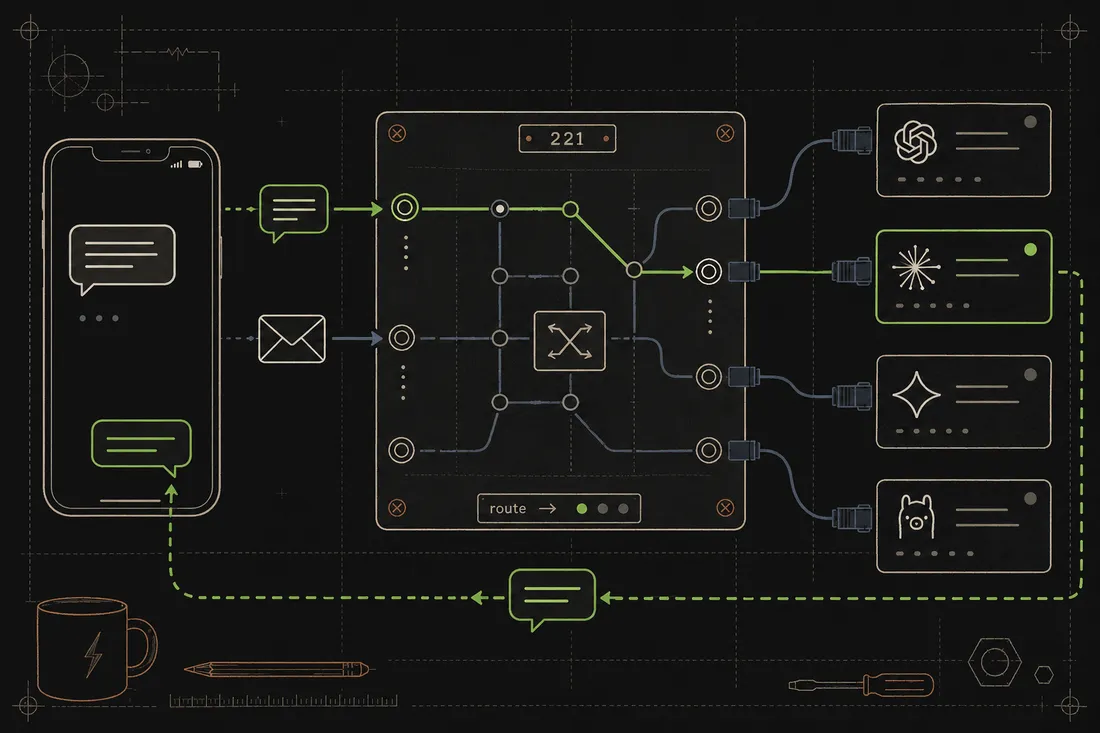
The neat part is that you might have four or five AI sessions going at once, each working on a different project. Signal Router figures out which one a message is meant for (based on a short code you type) and delivers it directly into that session's context. The AI replies with the same short code in its footer, so you always know which session answered. It also handles email: Gmail messages get picked up in real time and routed the same way, so you can ask a question from anywhere and get a reply without sitting at your desk.
What it does
Signal Router runs quietly in the background as a system service (a daemon, a little program that stays running all the time). It listens to Signal messages and Gmail via a live connection so new messages arrive instantly. When a message comes in, the daemon puts it in a small queue and wakes up the right Claude session to handle it. Each active session registers itself with a short code like "221". You text "/signal-router:221 What's the status?" and the router finds the session with that code, injects the message, and waits for Claude to reply. After the first message with a code, follow-ups route to the same session automatically. Multiple contacts can each have their own persistent session, so different conversations never bleed together.
Why it's neat
Reach any AI session from anywhere
Send a Signal text or email from your phone and the right AI assistant answers; no laptop required.
Short-code routing
A two- or three-digit code in your message tells the router exactly which running session to wake up.
Handles email too
Gmail is monitored live over IMAP, so emails from any contact can be routed and replied to automatically.
How it works
1. Daemon listens for incoming messages
A background service monitors Signal and Gmail around the clock, putting each new message in a queue.
2. Message gets matched to a session
The router looks up the short code or the contact's history to find the right active Claude session.
3. Claude picks up the message
A small bit of automation drops the waiting message into the right assistant so it sees it on its next reply.
4. Claude replies and the router delivers it
Claude calls a helper script to send the reply back via Signal or email, with its short code in the footer.