Gdocs RW
libraryA Python library that lets AI assistants read and write Google Docs cleanly, without bloating what the AI has to read.
AI assistants often need to work with documents - read a brief, update a table, append notes. Gdocs RW is a Python library that gives them a clean, efficient way to do that with Google Docs. It converts documents to a compact format the AI can read without burning through its memory, and it can write back headings, bullets, tables, and more with proper Google Docs formatting.
- Python
- Google Docs API
- google-auth
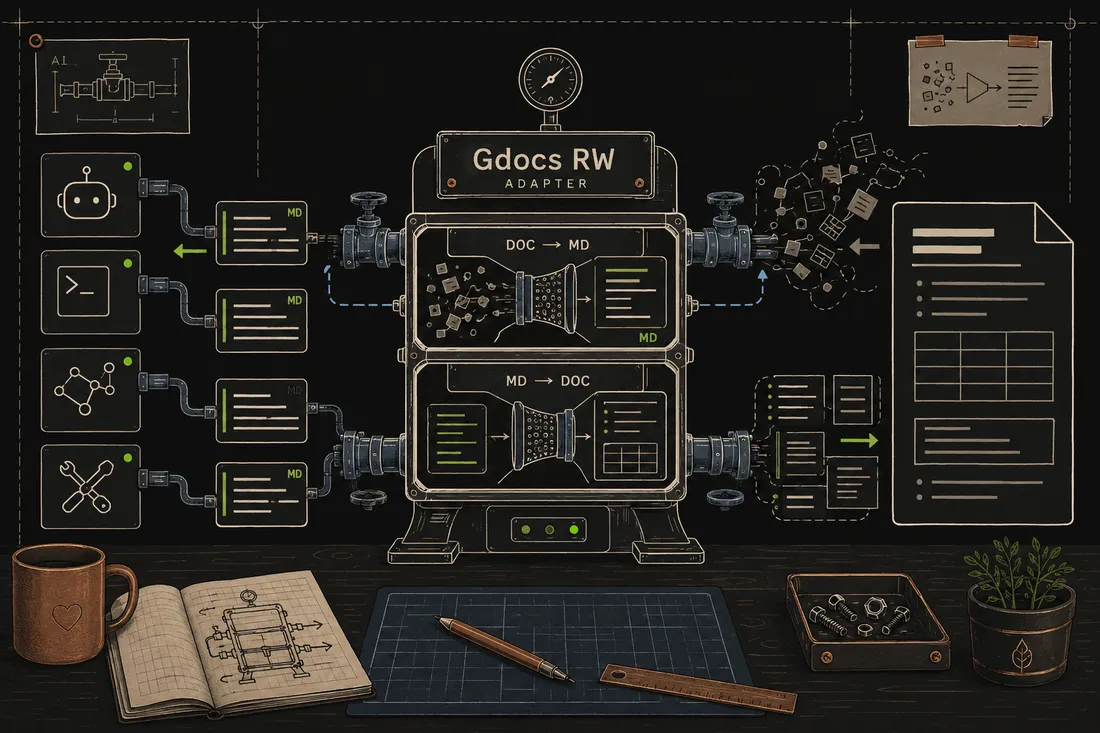
AI assistants have a limited amount of "working memory" (called a context window), and the messy raw data from Google Docs is enormous and wasteful, full of formatting codes and metadata the assistant doesn't need. Gdocs RW strips all that away and hands the assistant just the text, in markdown. Writing is just as clean: the assistant hands back markdown and the library translates it into properly formatted Google Docs content - bold headers, bulleted lists, styled tables. I built it to give my AI tools one shared way to handle Google Docs.
What it does
Gdocs RW is a building block I wrote to solve a recurring headache: getting AI assistants to work with Google Docs without either drowning them in raw API junk or losing all the formatting. The library wraps the Google Docs API with a much simpler interface. Reading a document returns clean markdown text. Writing accepts markdown and converts it into real Google Docs formatting - headings at the right level, bullet lists, numbered lists, and tables with styled headers and borders. It also handles multi-tab documents and can edit specific sections, insert content before a heading, or update individual table cells without touching the rest of the document.
Why it's neat
Token-efficient by design
Documents come back as compact markdown instead of massive API blobs, so AI assistants can actually read them without running out of memory.
Write real Google Docs formatting
Markdown goes in, and properly styled Google Docs content comes out - headings, lists, tables with shaded headers and clean borders.
One shared way for AI to use Docs
Claude, Codex, and Cursor all reach for this same library when they need to touch a Google Doc.
How it works
The library uses the existing credentials from my gog CLI - it reuses the Google sign-in I already set up.
One call returns the document's text content as clean markdown, stripping away all the raw API formatting noise.
Pass markdown to append a section, insert before a heading, or replace a section - the library handles the Google Docs formatting translation.
Individual table cells can be updated in place, preserving borders and header styling without recreating the whole table.