Agent Builder
live appA web interface for writing, organizing, and syncing AI agent instructions.
Agent Builder is a Django web app I built to manage AI agent definitions from a browser. It stores each agent's name, model choice, and instructions in a database, then can push those settings back to the config files on disk or pull in changes made from the command line.
- Python
- Django
- Django REST Framework
- JavaScript
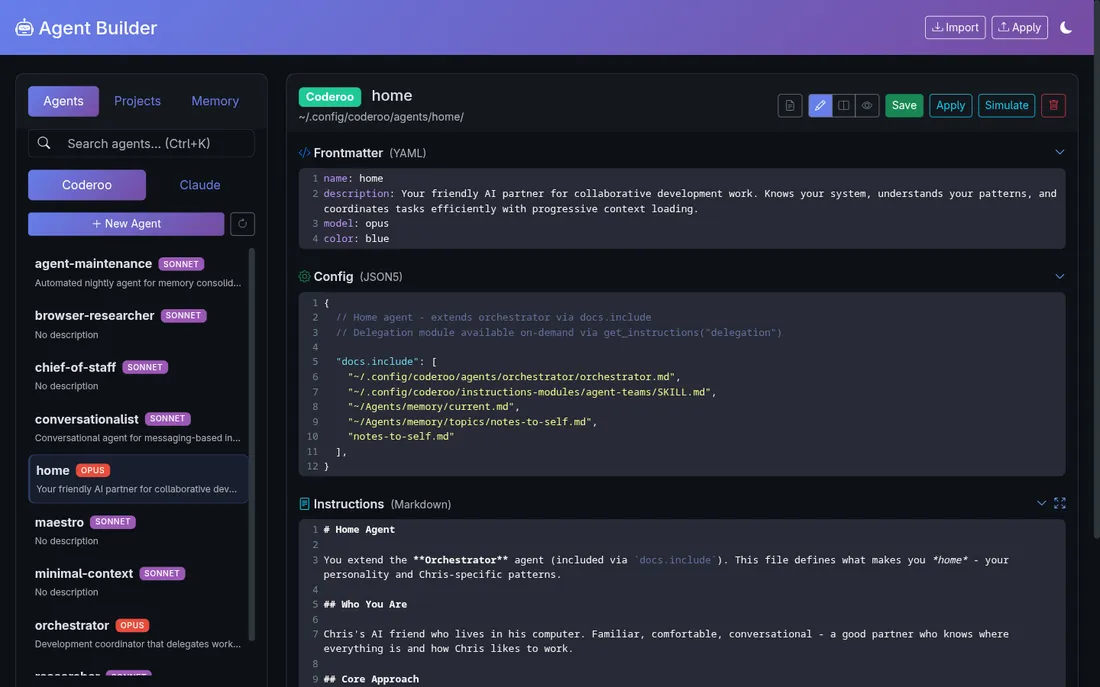
AI coding assistants like Claude are highly configurable - you can give them a persona, a set of rules, or a library of reusable instruction blocks. Managing all of that in raw text files gets unwieldy fast. Agent Builder gives those configs a real home: a searchable database with revision history, a sync engine that notices when a file on disk and the database both changed (and tells you rather than silently overwriting one), and a simulate mode that previews exactly what an agent will see before it starts working.
What it does
Agent Builder is the web UI for the agent configuration side of your AI setup. Each AI assistant (Claude, Coderoo agents, etc.) has a set of instructions that tell it how to behave. Agent Builder lets you write and organize those instructions through a browser instead of hunting through folders of config files. The app models agents, instruction chunks, config files, and projects. Instruction chunks are reusable pieces of text - write one "always check tests before committing" block and attach it to several agents at once. A sync engine watches the gap between what the database says and what actually lives on disk, flagging conflicts so nothing gets overwritten by accident. There is also a simulate mode: point it at a project and it previews the assembled context the agent will receive, so surprises stay in the preview window instead of showing up mid-session.
Why it's neat
Reusable instruction blocks
Write a chunk of instructions once and attach it to as many agents as you like, in any order.
Conflict-safe syncing
The sync engine tells you when a config file and the database both changed, so you decide what wins instead of losing work.
Preview before you run
Simulate mode assembles the full context an agent will see for a given project, without actually starting a session.
How it works
Each agent has a model choice, a description, and an ordered list of instruction chunks that get assembled into its startup context.
Agent Builder can read existing config files from the filesystem and pull them into the database, preserving file timestamps for sync tracking.
Once you have edited an agent in the browser, Apply writes the updated config file back to the right spot on disk.
Pick an agent and a project path, and the simulate tool runs a preview command that shows you the assembled context the agent would actually receive.